Integrate APIs in WordPress: Automate and Scale Your WordPress Services


Integrate APIs in WordPress, Integrar APIS en WordPress

Integrate APIs in WordPress

Introduction

In the agency world, time is everything. Automating repetitive tasks, connecting tools, and maintaining a seamless experience for your clients directly impacts your profitability.

That’s where a key (and often overlooked) concept comes in — APIs.

In this article, you’ll learn how WordPress + API integrations can help your agency automate processes, scale services without hiring more developers, and deliver more value to your clients.

What Is an API and Why It Matters to Your Agency

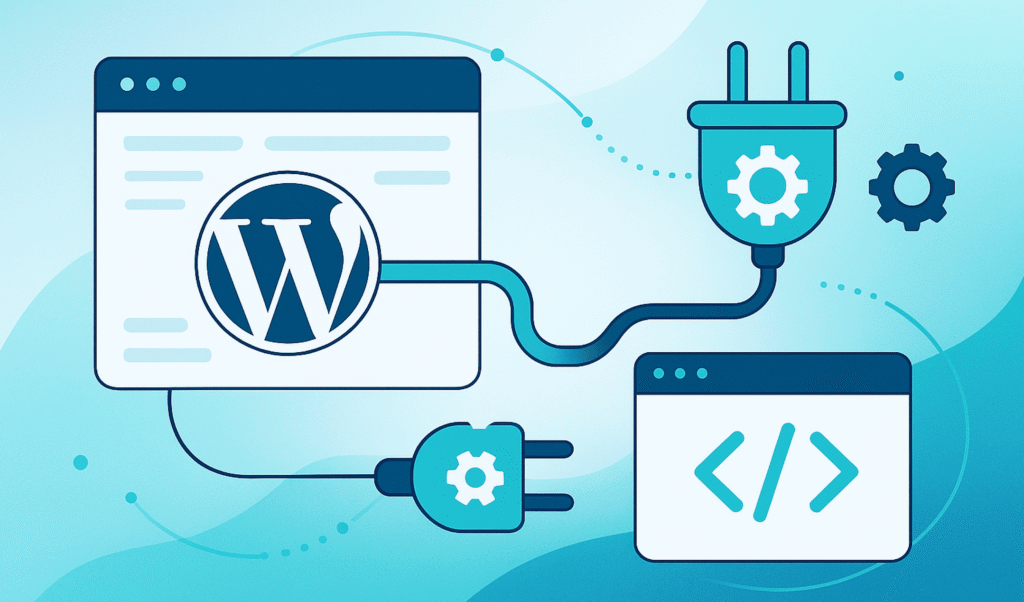
An API (Application Programming Interface) is a digital bridge that allows two different systems to communicate and share data.

For your agency, that means WordPress can:

  • Receive data from external tools (e.g., HubSpot, Mailchimp).
  • Send information to other platforms (like CRMs or reporting dashboards).
  • Automate manual processes that normally take hours.

Direct benefit: Less technical overhead, more time for strategy and creativity.

How WordPress Connects with an API

WordPress includes built-in functions that make working with APIs straightforward — no extra plugins required:

  • wp_remote_get()Retrieve data (for example, analytics results or product lists).
  • wp_remote_post()Send data (for example, push new leads to a CRM).

This gives your technical team the ability to integrate systems natively without bloating WordPress or relying on insecure third-party connectors.

Real Use Cases for Agencies

Here are common and powerful ways your agency can use APIs:

  1. CRM Integration
    Connect contact forms (Gravity Forms, WPForms, Fluent Forms) directly to CRMs like HubSpot, Pipedrive, or ActiveCampaign.
    → Leads are automatically added to the client pipeline — no manual exports.
  2. Automated Reporting
    Pull performance data from Google Analytics, Search Console, or Data Studio to generate client reports automatically.
  3. Real-Time Dashboards
    Display live ad campaign metrics (Google Ads, Meta Ads) directly inside a WordPress dashboard via API.
  4. eCommerce Syncing
    Synchronize inventories, products, or prices between WooCommerce and platforms like Shopify, ERPs, or marketplaces.

Best Practices for Secure and Scalable Integrations

Integrating APIs is not just about making them “work” — it’s about making them safe, stable, and maintainable.

  • Security first
    Always use HTTPS and store API keys securely (e.g., in wp-config.php): define('MY_API_KEY', 'your_api_key_here'); Never expose keys or tokens in the front-end.
  • Validate all data
    Always check the response format (usually JSON) before displaying it to users.
  • Respect rate limits
    Cache responses to avoid unnecessary API calls and stay within usage quotas.
  • Monitor connections
    Use uptime monitoring tools like UptimeRobot or Pingdom to detect API failures quickly.
  • Read the docs
    Always review the provider’s documentation: endpoints, authentication, limits, and pricing tiers.

Key Concepts Every Agency Should Understand

ConceptWhat It MeansWhy It Matters
EndpointThe specific URL that returns or accepts data.Defines where WordPress connects.
HTTP Methods (GET, POST)How data is requested or sent.Determines the type of interaction.
JSON FormatThe common “language” between applications.Makes it easy to read and process data.

Recommended Process for Integrating APIs in WordPress

  1. Define objectives
    What problem are you solving — automating reports, syncing data, improving UX?
  2. Plan your architecture
    Check authentication, endpoints, rate limits, and security needs.
  3. Develop and connect
    Use wp_remote_get and wp_remote_post to set up safe communication.
  4. Validate and test
    Test in a staging environment before pushing to production.
  5. Maintain and scale
    Monitor for changes in the API, update keys, and log performance regularly.

Common Mistakes to Avoid

  • Calling an API on every page load (use caching).
  • Displaying raw data without validation.
  • Exposing API keys or tokens publicly.
  • Relying on unmaintained plugins for integrations.

Conclusion: APIs as a Growth Engine for Your Agency

API integrations are more than a technical upgrade — they’re a growth strategy.

They help you:

  • Increase efficiency.
  • Reduce maintenance costs.
  • Deliver smarter, more automated services to your clients.

Agencies that master APIs can scale profitably — offering premium, data-driven solutions without inflating their technical team.
With WordPress + APIs, you scale your business — not your workload

Discover more in our Complete Guide for Marketing Agencies — learn how to scale your WordPress services without worrying about technical support.

Want to automate your WordPress processes and scale your agency without tech headaches? Learn how with WordPress Ongoing.

External authoritative sources

FAQs

1. What does it mean to integrate APIs in WordPress?

Integrating APIs in WordPress means connecting your website with external services — such as CRMs, ERPs, marketing platforms, payment gateways, or automation tools — through an Application Programming Interface (API). This allows data exchange and advanced functionality without relying solely on standard plugins.

2. Why is API integration important for marketing agencies?

For marketing agencies, API integration is essential because it helps automate workflows, centralize client data, and improve campaign performance. It also enables agencies to offer scalable, personalized solutions for each client without increasing technical or operational workload.

3. What are the basic steps to integrate an API into WordPress?

  • Define the goal of the API (for example, syncing leads or orders).
  • Obtain credentials or access tokens from the external service.
  • Install a plugin or create a custom API client within WordPress.
  • Test the integration in a staging environment before going live.
  • Monitor performance and document the process for ongoing maintenance.

4. What are the most common mistakes when integrating APIs in WordPress and how to avoid them?

Common mistakes include:

  • Ignoring API usage limits or quotas.
  • Exposing credentials or tokens without proper security.
  • Overloading the server with unnecessary requests.
  • Skipping pre-launch testing.
  • To avoid them, always review the documentation, implement data validation, use caching when possible, and monitor for errors.

5. Can an API integration be scaled or migrated as the agency grows?

Yes. When planned correctly, API integrations can scale with your business. You can separate logic into modules, use webhooks, microservices, or a middleware layer to manage multiple API connections efficiently — allowing your agency to grow without rebuilding integrations from scratch.


We are your technical ally for all things WordPress, so you can focus on growing your business.

Quote Icon
Working with Wordpress Ongoing has been a dream. The team are highly responsive, fast working and have always been accommodating to us. They've built multiple custom coded WordPress websites for us. Highly recommend.
Samuel Rawlings
Samuel Rawlings
Director at First Rate Marketing

Empower Your WordPress Journey

Group collaborating around a laptop.

If you’re working on WordPress-related projects and need dependable WordPress development support, WordPressOngoing can help. We focus on building long-term partnerships by delivering high-quality work, fast solutions to issues, and consistently responsive communication—so your team can move forward with confidence.